“Convert PNG to PDF online quickly and securely with our free PNG to PDF Converter. Preserve image quality, merge multiple PNGs into one PDF, and download instantly—no software needed.”
PNG to PDF Converter
PNG to PDF Converter – Free, Fast & Secure Online Tool
In today’s digital world, file format conversion is an everyday need. One of the most common requirements is converting PNG images into PDF documents. Whether you are a student submitting assignments, a professional preparing reports, or simply someone who wants to keep images organized, this converter is the perfect solution.
This article will guide you through everything you need to know about converting this converter, its benefits, features, and how to use an online tool effectively.
What is a PNG to PDF Converter?
It is a tool that allows you to transform image files in PNG format into PDF documents. Unlike PNGs, which are image-only files, PDFs are universally accepted for sharing, printing, and documentation. By converting PNG to PDF, you ensure that your images are preserved in a secure, compact, and professional format.
Why Do You Need to Convert?
There are many reasons why people prefer converting images into PDF documents. Let’s look at the most important ones:
- Universal Compatibility – PDFs can be opened on any device, browser, or operating system without formatting issues.
- File Organization – You can combine multiple PNG images into one PDF file for easier sharing and storage.
- Professional Presentation – A PDF looks more formal and structured than sending multiple loose image files.
- Reduced File Size – PDFs often compress images, making them smaller and easier to send via email or upload online.
- Data Security – PDFs can be password-protected, adding an extra layer of security to your files.
Key Features
When choosing the right converter, look for these essential features:
- Free & Easy to Use – No hidden charges or technical skills required.
- High-Quality Conversion – Images retain their sharpness and clarity after conversion.
- Multiple File Support – Convert one PNG or bulk convert multiple PNG files into a single PDF.
- Cross-Device Access – Works seamlessly on desktop, mobile, or tablet without installation.
- Secure & Private – Your uploaded files are automatically deleted after conversion.
- Fast Processing – Instant conversion with no waiting time.
How to Convert PNG to PDF Online – Step by Step
Using an online converter is quick and straightforward. Here’s how you can do it in just a few steps:
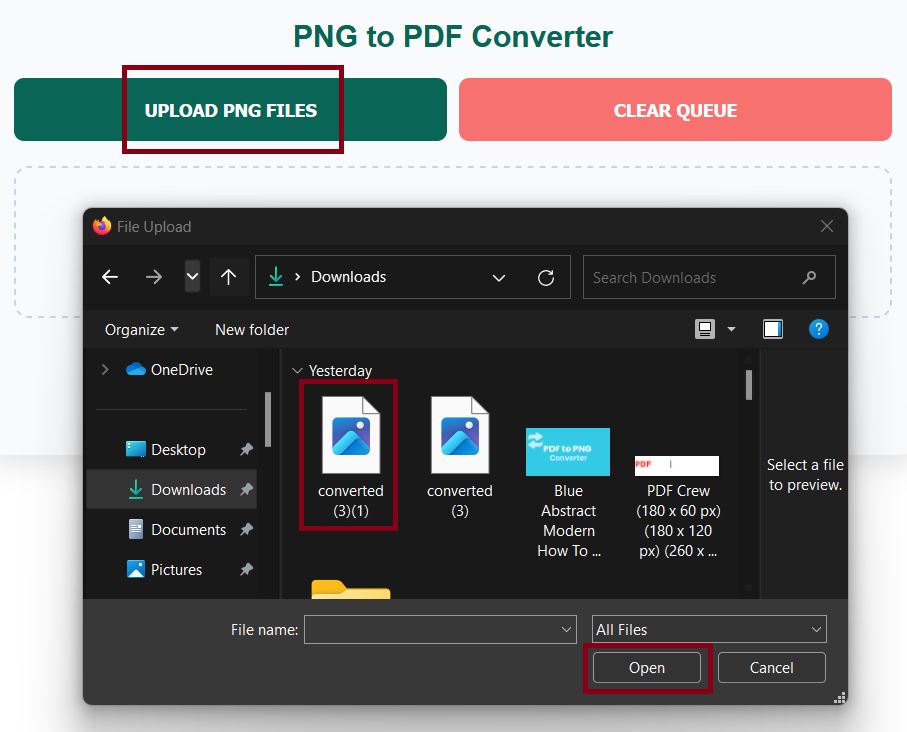
- Upload PNG Files – Select one or multiple PNG images from your device.
- Arrange Order (Optional) – If you’re merging multiple images, arrange them in the sequence you prefer.
- Choose Settings – Adjust options like page size, margins, or orientation (portrait/landscape).
- Click Convert – Hit the convert button and let the tool process your files.
- Download PDF – Save the converted PDF file instantly to your device.
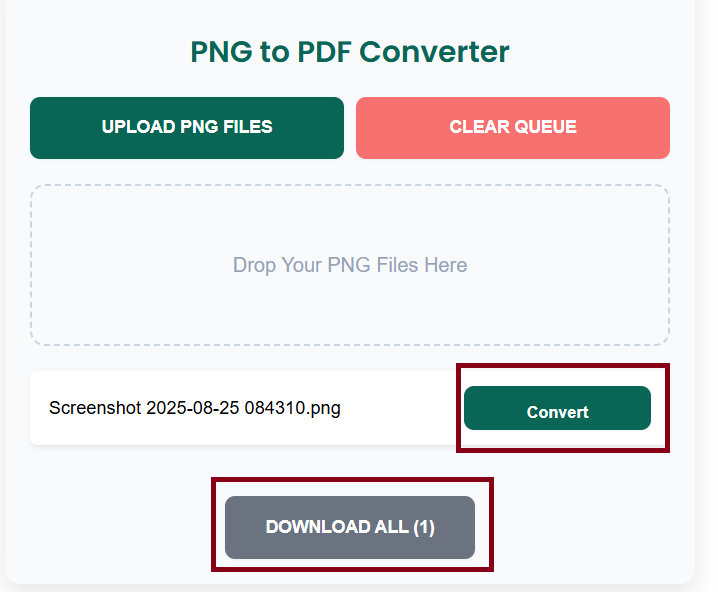
That’s it! No installations, no complicated software – just fast and secure conversion.
Advantages of Using
Here are the top benefits of using an online tool instead of offline software:
- No Installation Required – Works directly from your browser.
- Free Forever – Many online converters are 100% free.
- Time-Saving – Converts files within seconds.
- Accessibility – Use it from anywhere, anytime, as long as you have internet access.
- Works Across Platforms – Supports Windows, macOS, Linux, Android, and iOS.
Best Practices for Conversion
To get the best results, follow these simple tips:
- Use High-Resolution Images – Low-quality PNGs will result in blurry PDFs.
- Combine Images in Order – Arrange them properly before conversion for a smooth flow.
- Check File Size – Compress large PNGs if needed to ensure smaller PDF output.
- Choose the Right Orientation – Portrait works best for documents, while landscape suits wide images.
- Secure Your PDF – Add password protection if the document contains sensitive information.
Common Use Cases
- Students – Submit handwritten notes or assignments scanned as PNGs in a neat PDF.
- Professionals – Share reports, charts, and documents in an organized format.
- Freelancers – Send design samples or image-based work in PDF format.
- Businesses – Convert invoices, receipts, and scanned documents into PDFs.
- Personal Use – Store family photos or important images in PDF for safe-keeping.
Security of Converter
One major concern when using online tools is security. A good converter ensures:
- End-to-End Encryption – Files are transferred securely.
- Auto-Deletion – Uploaded files are deleted after a short time.
- No Third-Party Access – Files are not shared or stored permanently.
This ensures your personal or professional documents remain safe.
FAQs
Q1. Is an online PNG to PDF converter free to use?
Yes, most online converters are free and don’t require registration.
Q2. Will my image quality reduce after conversion?
No, a good converter preserves original quality without pixelation.
Q3. Can I convert multiple PNGs into one PDF?
Yes, you can merge multiple PNG images into a single PDF file.
Q4. Is it safe to upload my images online?
Yes, reliable tools delete files automatically after processing.
Q5. Can I use a PNG to PDF converter on mobile?
Absolutely! Most online converters are mobile-friendly.
Final Thoughts
It is a must-have tool for anyone who frequently works with images and documents. It simplifies file sharing, improves presentation, reduces file size, and ensures compatibility across all platforms.
Whether you are a student, professional, or casual user, using a free online converter saves time, maintains quality, and keeps your files secure.
So, next time you need to convert your PNG images into a professional, easy-to-share format, just use a reliable online Converter – fast, free, and secure!